CRM Workflow Automation: How to Connect Sales and Marketing Without Losing Leads

Most companies don’t lose leads because marketing has stopped generating them. They lose leads in the three seconds between a form submission and someone in sales actually seeing it. That gap, small as it looks on paper, is where deals quietly die.
CRM workflow automation aims at closing that gap. When well implemented, it transforms a confusing handover between two departments into a streamlined, controllable workflow. Unfortunately, if you mess it up with an inadequate workflow implementation, it will only lead you down the same track and hide the problems under a shiny dashboard without fixing them.
What CRM Workflow Automation Actually Means
CRM workflow automation contains the rules, triggers, and system connections used to move a prospect from marketing to sales by simply letting the system follow rules without requiring humans to go through the same motions, copy-paste tags, and send emails. We also get updates to lifecycle stages, ownership assignment notifications, scoring changes, and data enrichment as part of this process, without us having to say, ’email someone if they fill out the form. ‘
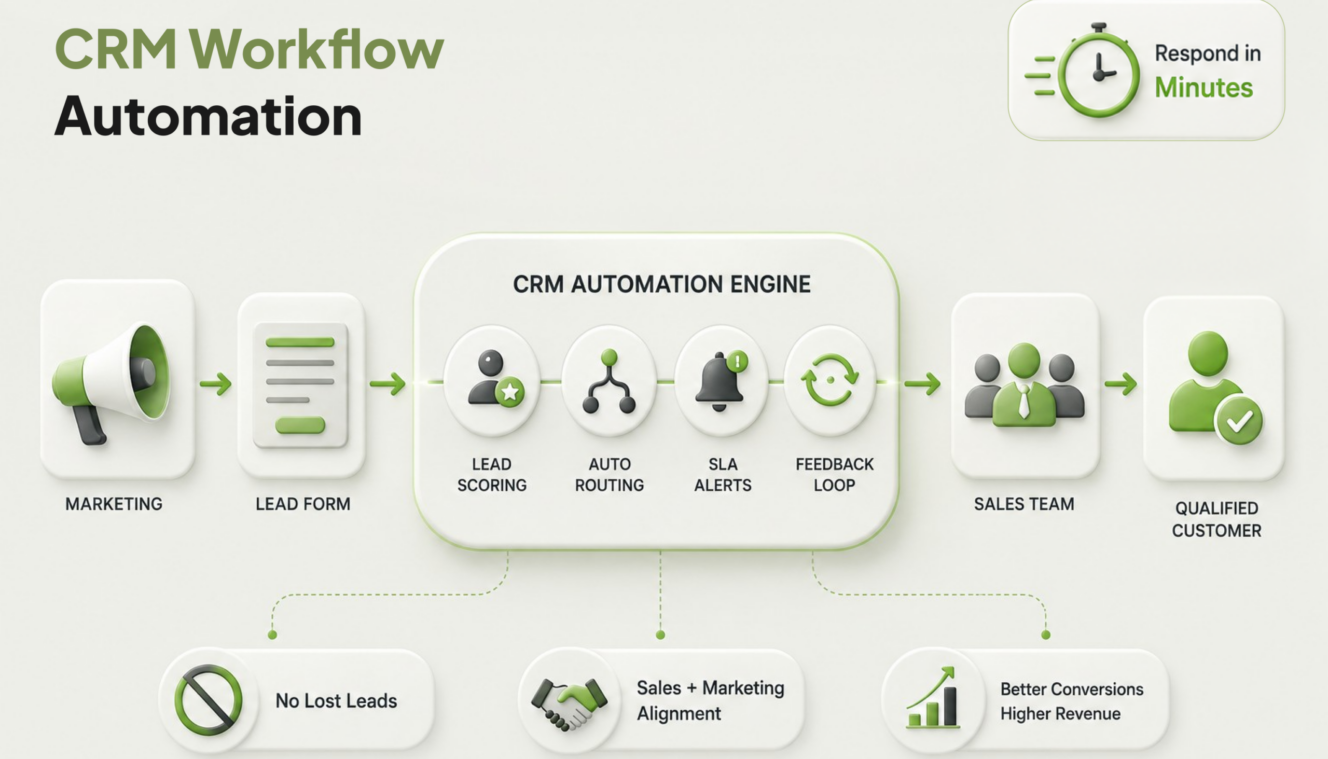
A lot of teams stop at that narrow definition. They wire up one automation, a welcome email or a Slack ping, and call it done. It isn’t. Real CRM workflow automation covers the full path: capture, qualification, routing, notification, and feedback back to marketing on what happened to the lead. Skip any one of those, and leads fall through the cracks somewhere else in the chain.
Why Leads Get Lost Between Marketing and Sales
Here’s the uncomfortable part. Only about 30% of sales professionals believe their sales and marketing teams are closely aligned, according to HubSpot’s research on sales statistics. Yet 78% of sales professionals say their CRM is effective at improving alignment between sales and marketing teams when it’s actually configured for that purpose. The tool works. The setup usually doesn’t. Three failure points show up over and over:
- No shared definition of what counts as a qualified lead, so marketing sends volume, and sales ignores half of it.
- No SLA on response time, so hot leads sit in a queue for two days
- No feedback loop, so marketing never learns which leads actually closed and keeps optimizing for the wrong signals
Speed matters more than most teams admit. Leads contacted within the first few minutes convert dramatically better than those followed up with hours later. Every hour that passes without action is an hour a competitor gets to that same prospect first.
Building a CRM Workflow That Doesn’t Leak Leads
Step one: define the handoff criteria before you build anything.
It’s absolutely necessary that marketing and sales understand when a lead is ready for sales. That should be based on job title, company size, engagement score, or any such metrics. Write that down. If you skip this step, then no clever automation later will solve it for you.
Step two: automate lead scoring and routing together.
Scoring without routing just creates a longer list that nobody acts on. Set up your CRM for marketing so that once a lead crosses the qualification threshold, it’s automatically assigned to the right rep or team based on territory, product interest, or account size. No manual triage queue.
Step three: build in an SLA and make the CRM enforce it.
This is the piece most companies skip. A workflow should flag any lead that hasn’t been touched within a defined window, say 30 minutes for high-intent leads, and escalate it. Do not politely remind someone. Escalate.
Step four: close the loop back to marketing.
Sales should log outcome data (contacted, disqualified, converted, no response) in a format marketing can actually use. Without this, marketing automation runs blind, generating more of the same lead type regardless of whether it’s converting.
Marketing Automation Benefits Only Show Up With the Right Foundation
Marketing automation benefits get oversold constantly. The reality is more modest and more useful: fewer manual handoffs, faster response times, cleaner attribution, and a sales team that trusts the leads showing up in their queue instead of ignoring them. That trust is the actual win. Companies with aligned sales and marketing functions see higher retention and win rates than siloed teams, and most of that gap traces back to exactly this kind of workflow discipline, not better ad creative or a bigger budget.
Marketing workflow automation isn’t a replacement for strategy. It’s what makes a good strategy survive contact with a busy sales team.
Common Mistakes Worth Avoiding
Frankly, most CRM workflow automation projects fail for random reasons, not due to technical errors.
Teams over-automate the wrong stage and build intricate email nurturing sequences without realizing that the hand-off to the sales team is still happening via Slack messages that nobody tracks. Some set scoring thresholds just once and fail to revisit them. Also, many people do not take SLA into account at all, thinking it is more of an issue for sales managers than a marketing automation one. Frankly, it is a problem for both.
The fix isn’t more tools. It’s usually fewer, better-connected ones with clear ownership at each stage.
The problem of losing leads during the transition between departments isn’t exclusively a sales problem or a marketing problem. If your CRM and marketing automation platform aren’t communicating effectively, EcomVA could support you not only in designing a handoff map but also in identifying and activating the correct triggers and ensuring that sales actually handle the leads that marketing delivers.
Frequently Asked Questions
1. What is CRM workflow automation?
CRM workflow automation uses rules, triggers, and automated actions within a CRM to move leads through processes such as scoring, routing, notifications, and status updates without relying on manual data entry between marketing and sales teams.
2. How does CRM workflow automation prevent lost leads?
CRM workflow automation reduces common gaps in manual handoffs, such as unassigned leads and delayed follow-ups. It can automatically route qualified leads to the appropriate sales representative and flag leads that have not been contacted within a defined timeframe.
3. What’s the difference between marketing automation and CRM workflow automation?
Marketing automation primarily focuses on lead nurturing and engagement before prospects become sales-ready. CRM workflow automation manages what happens afterward, including lead qualification, routing, notifications, and the handoff between marketing and sales teams.
4. How fast should a sales team respond to a new lead?
High-intent leads should ideally receive a response within minutes rather than hours. Prospects are often most engaged immediately after submitting an inquiry, so a fast response can improve the chances of making contact before their interest declines or they approach a competitor.
5. What tools are needed to set up CRM workflow automation?
You need a CRM with workflow automation capabilities, such as HubSpot or Salesforce, along with a way to connect your CRM and marketing automation systems. Native integrations, APIs, or third-party platforms such as Zapier can facilitate these connections. A well-configured basic CRM can often outperform a more advanced platform that is poorly implemented.
6. Who should own CRM workflow automation, sales or marketing?
CRM workflow automation should be a shared responsibility between sales and marketing. Marketing can manage areas such as lead scoring and nurture logic, while sales can define lead routing requirements and follow-up service-level agreements. Clear ownership across both teams helps keep workflows aligned.